
Introduction
Short answer: pre-hire assessments help shortlist better candidates by testing the skills a role needs before interviews begin, giving every applicant the same task and the same scoring. That makes the shortlist more consistent than CV screening alone and saves interviewers from spending time on candidates who are not a fit.
CVs show what someone says they have done. They do not show how they solve problems, communicate or apply a skill. When applications run into dozens or hundreds, recruiters also have little time per CV, so shortlisting can drift towards familiar names and keywords.
This article covers when assessments make sense, how to design them fairly, how to score them, and how to combine them with interviews.
When Assessments Are Worth Using
Assessments add effort for candidates and for your team, so use them where they improve the decision.
- Roles with testable skills, such as coding, writing, accounting, data entry or customer support.
- High-volume hiring, where many applicants must be compared quickly.
- Roles where CVs are a weak signal, such as early-career positions.
- Positions where a wrong hire is expensive.
- Teams that want a more objective first filter and less reliance on pedigree or keywords.
Designing a Fair Assessment
A poor test is worse than none, because it filters out good candidates for the wrong reasons.
1. Test what the job needs
List the three or four skills that matter most in the role and test those. Avoid generic puzzles that do not resemble the work.
2. Keep it short
Aim for a length candidates can finish in a reasonable time. Long tests reduce completion rates and exclude people with less free time.
3. Make instructions clear
State the time limit, what is being evaluated and how to submit. Ambiguity tests patience, not ability.
4. Give everyone the same test
Use the same questions, time limit and scoring for every candidate in the same round so results are comparable.
5. Check for accessibility
Make sure candidates with different devices, connections or needs can take it, and offer reasonable adjustments.
6. Pilot it first
Have a few current employees take the test to check that the difficulty and time are realistic.
Common Types of Pre-Hire Assessment
| Type | What it shows | Best for |
|---|---|---|
| Skills test | Whether the candidate can do a core task | Technical, finance, support and operations roles |
| Aptitude or reasoning test | General problem solving and numerical or verbal ability | High-volume and early-career hiring |
| Work sample or case task | How the candidate approaches a realistic problem | Roles with defined deliverables |
| Situational questions | Judgement in realistic scenarios | Customer-facing and people-management roles |
| Video-based response | Communication and presentation | Roles that need strong communication |
Scoring and Using the Results
How you score decides whether the assessment is fair.
- Define the scoring criteria before anyone takes the test.
- Use the same criteria for every candidate and, where possible, have more than one reviewer score open-ended answers.
- Treat the score as one input, not the only one. Combine it with the CV, interview and references.
- Set a threshold for moving to interviews and apply it consistently.
- Review results over time to check that the test actually predicts good performance.
- Give candidates timely feedback or a status update, because silence damages your employer brand.
Integrity, Fairness and Candidate Experience
Online assessments raise understandable concerns about integrity. Some platforms monitor for unauthorised activity during the test, such as switching windows or getting outside help. If you use monitoring, tell candidates in advance what is recorded and why, and use the information as a prompt to look closer rather than as an automatic rejection.
Candidate experience matters as much as accuracy. Strong candidates have options, and a long, unclear or unreciprocated test can lose them. Communicate clearly, respect their time and explain what happens next.
DASH HR includes assessment and pre-online-test capabilities for screening candidates before interviews, alongside job posting, applications, interview scheduling, feedback and offer letters, so assessment results stay with the candidate record. A video-enabled online assessment with unauthorised-activity tracking is available as an add-on module.
Pitfalls to Avoid
Assessments can backfire when used carelessly.
- Using a test that does not resemble the work, so it filters on the wrong things.
- Setting a time limit that favours people with the fastest connection or most free evenings.
- Changing the test or scoring part-way through a hiring round.
- Relying on the score alone and ignoring experience or interview performance.
- Leaving candidates without any update after they have spent time on the task.
- Collecting more personal data than the assessment needs.
Checking Whether the Assessment Works
An assessment is only worth keeping if it predicts something useful. After a few hiring rounds, compare candidates' scores with how they performed in interviews and, later, in the job. If high scorers are not doing better than average, the test may be measuring the wrong thing, or the threshold may be wrong.
Also look at who completes the test. If many strong candidates drop out part-way through, it may be too long, unclear or technically awkward. Collect short feedback from candidates and adjust. A good assessment improves with each round.
Combining Assessments With Interviews
Assessments work best as the first of several signals.
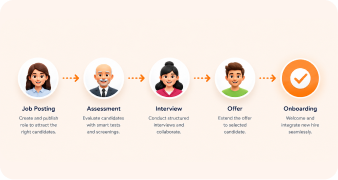
1. Screen the application
Use the CV and basic requirements to decide who is invited to take the assessment.
2. Run the assessment
Send the same task and time limit to every shortlisted candidate with clear instructions.
3. Score consistently
Apply the criteria you defined in advance and record the results with the candidate.
4. Use results to focus the interview
Ask about the areas the assessment showed as strong or weak, so interviews explore rather than repeat.
5. Decide on the whole picture
Combine assessment, interview and references, and record the reasons for the decision.
Legal and Ethical Considerations
Treat assessment data as personal data. Tell candidates what you collect, why, how long you keep it and who sees it, and delete it when it is no longer needed. Avoid questions that touch on protected characteristics or are unrelated to the role.
Be prepared to explain how the assessment relates to the job, and to offer adjustments for candidates who need them. A transparent, job-related process is both fairer and easier to defend.
Key Takeaways
- Assessments give every candidate the same test and scoring, which makes shortlists more consistent than CV screening alone.
- Test the skills the job actually needs and keep the assessment short.
- Define scoring criteria in advance and use the result as one input among several.
- Be transparent about any monitoring and keep the candidate experience respectful.
- Keep results with the candidate record so interviewers can use them.
Shortlist Better, Interview Smarter
See how DASH HR connects assessments with applications, interviews and offers.
Frequently Asked Questions
It is a test or task candidates complete before interviews to show relevant skills or judgement. It gives recruiters a consistent way to compare applicants.
They can be, if they test skills the job needs, use the same conditions and scoring for everyone, and are accessible. A poorly designed test can be unfair, so pilot it first.
Short enough that most candidates can complete it comfortably, often under an hour for a first-round screen. Longer tasks should be reserved for later stages and kept relevant.
No. They are a screening step. Interviews assess communication, motivation and fit in ways a test cannot.
They can reduce reliance on CV pedigree and keywords by evaluating everyone on the same task. They do not remove bias entirely, so combine them with structured interviews and review outcomes.